TL;DR
What does Google Ads actually cost for my trade in my city, and what budget would I need?
There's no useful average — your cost per click is set by what competitors in your trade and city bid, from a few dollars to $30+. Our free tool shows the real CPC for your market and works backward from clicks to leads to the monthly budget that would actually compete, before you spend anything.
You’ve thought about Google Ads. You asked a friend who runs a plumbing business what it costs. He said “depends.” You Googled “how much does Google Ads cost” and got three articles saying different things — one said $2-15 per click, one said $8 average, one said “it depends on your industry.”
None of them told you what it costs for YOUR trade in YOUR market. So you either haven’t budgeted for Google Ads at all, or you set a random $1,000/month cap that either burns through in three days or delivers eight clicks all month.
This post walks through what Google Ads actually costs for home-service businesses in the SGV, why the numbers are what they are, and how to plan a real budget instead of guessing.
Google Ads cost is set by your competitors, not by Google
Here’s the mechanic almost nobody explains clearly.
Every time somebody types “plumber near me” in Google, Google runs a live auction. Every advertiser who wants to show up for that search puts in a bid — the maximum they’re willing to pay for that click. The advertiser with the highest bid (weighted by ad quality) wins the top ad slot. What they actually PAY is the second-highest bid plus a penny.
Which means the price of a Google Ads click for your trade isn’t set by Google. It’s set by whoever’s bidding against you.
In a market with a lot of home-service advertisers — the SGV is one — bids get pushed up. Plumbers bidding against plumbers bidding against HVAC contractors bidding against roofers. Every one of them is buying visibility for the same finite auction slots. That’s why a plumber click in Whittier costs more than a plumber click in a small rural town where there are three plumbers total.
You need to know what the auction actually clears at in your market before you know what to budget.
Why “average CPC” articles are useless
Almost every article you’ll find online quotes an “average CPC” number. The problem is those averages are aggregated across dozens of trades, thousands of markets, and every keyword variant. They mean nothing for a plumber in Alhambra deciding whether to advertise for “emergency plumber” specifically.
The number you actually need to know:
- Your specific trade — plumber, HVAC, electrician, roofer, painter, garage door, pest control, locksmith, landscaper, or general contractor
- Your specific market — the auction dynamics in the SGV are different from Riverside, which are different from Sacramento
- The specific keyword variants your customers type — “plumber Whittier” is a different price from “emergency plumber Whittier” is a different price from “drain cleaning near me”
You can’t budget until you have those three at once. And there’s no shortcut — either you pay for a keyword research tool that surfaces this, or you find a free source that pulls it.
What the tool actually shows
We built the Google Ads Cost tool to give you that exact number without paying for a keyword research subscription. Pick your industry from the dropdown. Pick your California city. Toggle Residential or Commercial keywords.
You’ll get:
- Three headline stats at the top of the report: your average cost per click across the top 20 keywords for your trade + city, the top-of-page bid range (lowest to highest across those keywords), and the total monthly search volume you’d be competing for.
- A suggested monthly budget in a big green number: what you’d need to spend to hit a specific lead goal in this market. Defaults to 20 leads/month but has a slider so you can dial it from 5 to 100.
- A bar chart ranking the 10 most expensive keywords by cost per click — the ones the market is fighting hardest over.
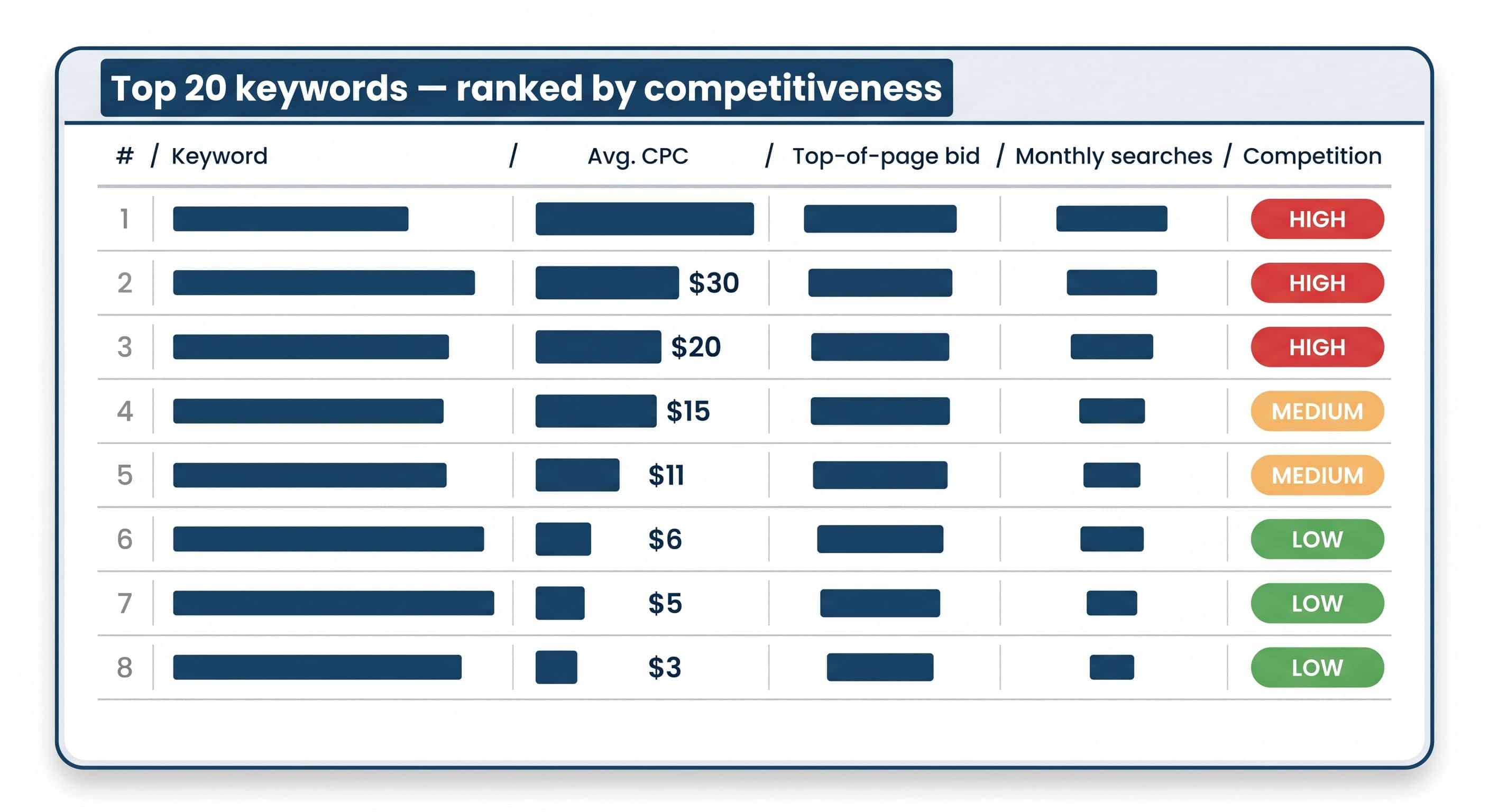
- A full table of the 20 most competitive keywords in your trade + city, showing avg CPC, top-of-page bid range, monthly search volume, and a competition-level pill (HIGH in red, MEDIUM in amber, LOW in green).
- A data-refresh timestamp so you know when the numbers were last pulled from Google Ads.
The data comes from Google Ads themselves via DataForSEO. One note the tool calls out: ad costs are set by the wider auction market, so the numbers reflect the metro area that includes your city, not the city alone. That’s how the auction actually works.
Takes 30 seconds. Free — one name and email at the gate, then the tool loads the data and shows the report on the page. That’s the trade: you get the numbers, we get to know who to follow up with.
How to read the three headline numbers
Average CPC. This is what you’ll typically pay per click at top-of-page placement across the 20 keywords. If it says $18.50, that’s your realistic per-click cost. A click doesn’t equal a lead — it equals someone landing on your website. If 1 in 10 clicks becomes a lead (a reasonable rate for a well-built landing page), your cost-per-lead is $185.
Top-of-page bid range. The lowest and highest across the 20 keywords. If you see “$3.20 – $47.80,” that spread is telling you something important: some keywords in your market are cheap because nobody’s bidding on them, and some are war zones because everyone is. The cheap ones are opportunities. The expensive ones are where you decide whether to fight or route around.
Monthly searches (top 20). How much traffic is available if you show up for all 20 keywords. This is your ceiling — the maximum audience the market can send you through paid search. Realistically you’ll get a small fraction, but knowing the ceiling tells you whether the market is even big enough to bother.
The per-keyword competition pills on each row are the tactical read. HIGH means every major competitor is bidding on that keyword. MEDIUM means some are. LOW means the keyword is under-competed — usually a specific service name variant everyone forgets to target and where the smart money is.
The budget calculator turns clicks into leads
The green budget number is where most owners actually understand what they need to spend.
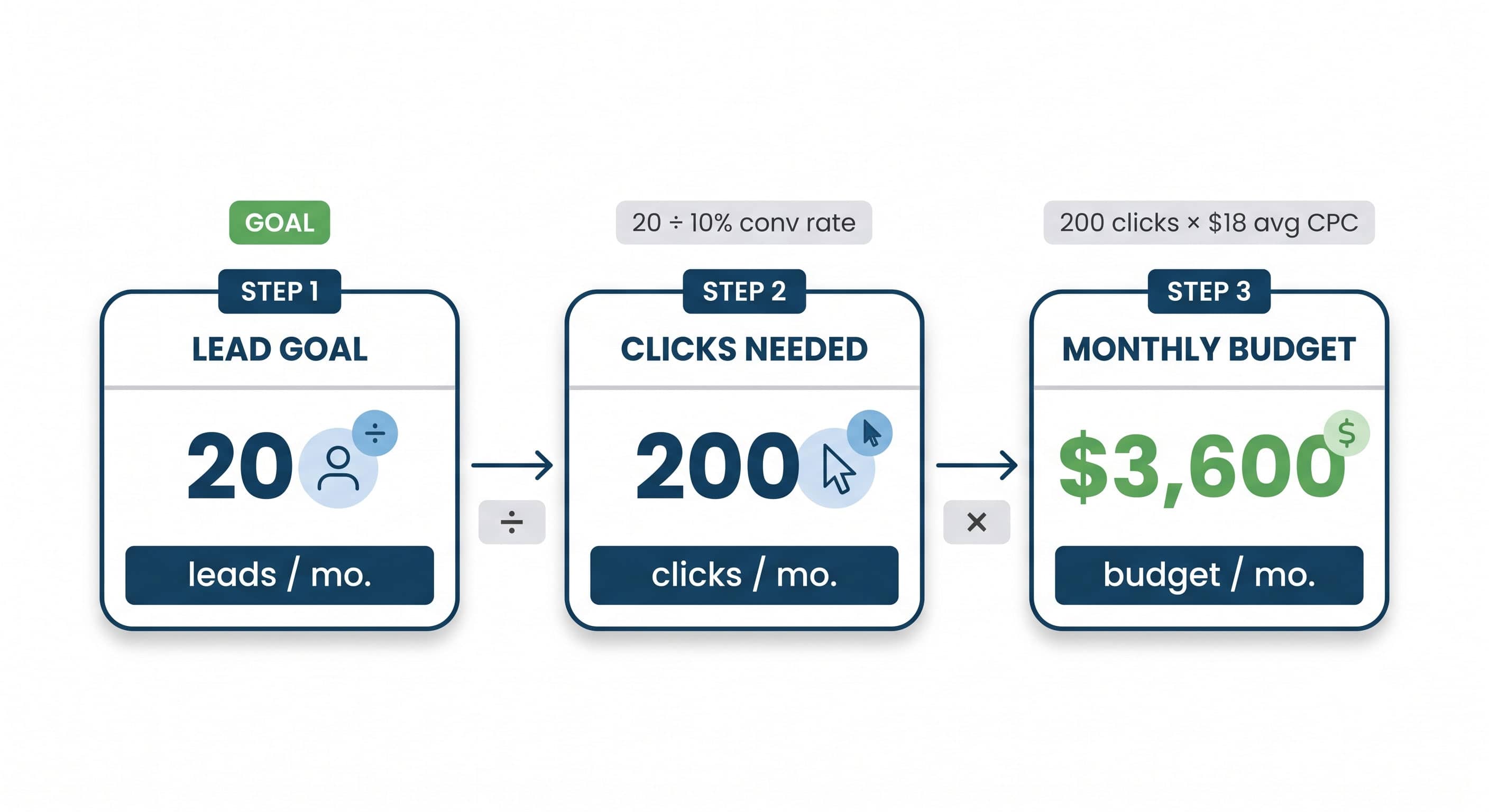
Google clicks are useless on their own. What you actually want are leads — people filling out a form or calling. The tool assumes a 10% landing-page conversion rate (industry-average for a well-built home-service landing page) and computes: to get X leads per month, you need X divided by 10% clicks, and clicks × mean bid = monthly budget.
If your goal is 20 leads/month and the market’s mean top-of-page bid is $18, you need about 200 clicks × $18 = $3,600/month. The tool rounds to the nearest $50 and shows you the low-to-high range based on where in the bid spread you’re actually competing.
Slide the lead goal from 5 to 100 and watch the budget scale in real time. That slider is doing more than showing a number — it’s giving you the specific budget for the specific outcome you’re planning around.
Two caveats the tool itself calls out in fine print, both worth taking seriously:
- The 10% conversion assumption depends on YOUR landing page. If your landing page is your homepage with a phone number buried in the footer, you’re probably at 2-3% and need triple the budget for the same leads. If you’ve built a purpose-designed landing page for the campaign, you might hit 15%.
- The budget calculates cost to get leads, not to close them. Your close rate on those leads (typically 20-40% for home-service depending on trade and lead quality) determines actual booked-job cost.
What most SGV owners don’t realize until they see the numbers
Three patterns show up in almost every tool result we’ve walked through with home-service owners in the SGV.
Commercial keywords cost 2-3x more than residential. If you serve both, the tool’s Residential/Commercial toggle will show you the gap. Commercial jobs are bigger, higher-margin, and more competitive — the auction reflects that. If you’re planning to run one campaign covering both, you’re setting yourself up to overpay for one and underpay for the other. Run two campaigns and budget each separately.
Emergency keywords are the most expensive per click AND the highest-converting. “Emergency plumber,” “24 hour AC repair,” “same-day roofer” — these are the top of the CPC chart in almost every trade. They cost more per click but they book at higher rates because the searcher’s intent is peak: they need someone right now and they’re going to call the first name they see.
Local Service Ads (LSA) sit above regular Google Ads. For eligible trades — plumbing, HVAC, electrical, roofing, garage door, locksmith, pest control — LSA runs above the Google Ads block on mobile. LSA charges per lead rather than per click and often delivers cheaper-per-lead economics than traditional Google Ads. If your trade is LSA-eligible and you’re planning any Google spend, budget for LSA first and traditional Google Ads second.
Check yours in 30 seconds
Enter your industry, California city, and residential-vs-commercial toggle into the Google Ads Cost tool. You’ll get the same numbers we look at when we build a Google Ads plan for a new client. Free — name and email at the gate, then the tool loads the data and shows the report on the page. No upsell inside the tool.
Two things to look for the moment your result loads:
- Your avg CPC vs the top-of-page bid range — that spread tells you whether your market is uniform (small spread, everyone competing on similar keywords) or wide-open (big spread, opportunities hiding in the low-competition rows)
- The suggested budget at your realistic lead goal — that’s the ballpark of what you’d need to spend to make Google Ads actually work for you
How City Boost helps
We do Google Ads Management for home-service businesses across the SGV — the keyword strategy, landing-page conversion work, and budget management that turn the numbers in this tool into booked jobs. If your result comes back showing a competitive market with $15-30 clicks, that’s the exact scenario we help owners navigate every week — figuring out which keywords to fight for, which to skip, and what landing page will actually convert at 10% or better.